School district registration season opens the same way every year — and in too many districts, it immediately becomes a pressure cooker. Phones ring off the hook. Families arrive at the front desk with paperwork and questions. And somewhere in the middle of all of it, your registrar is holding the whole operation together with email threads, sticky notes, and institutional memory.
Your Student Information System is running the whole time.
It’s not helping with any of this.
That’s not a staffing problem or a budget problem. It’s a design problem.
Your SIS Was Built for the Output, Not the Process
Here’s what doesn’t get said out loud enough: your SIS was built to store the result of registration — the final, verified student record. It was never designed to run the process that produces it.
Every time a family submits an application, your SIS quietly assumes the data arrived clean and complete, that documents were collected and reviewed, that the address was validated, that medical clearances came through, and that every exception was handled. It assumes all of that just happened.
Ask yourself who actually makes those things happen:
- Who tracks which applications are pending — and why each one is stuck?
- Who coordinates with the nurse for immunization clearance tracking?
- Who flags it when a proof of address doesn’t look right?
- Who notifies families of their status — and where is that communication logged?
In most districts, the honest answer is: someone’s inbox, a spreadsheet, a stack of folders, and the memory of whoever has been doing this the longest.
WORTH UNDERSTANDING
The gap between what the SIS expects and what the registrar actually manages — that’s where most enrollment seasons quietly fall apart. The SIS never sees it. The registrar lives in it every day.
What the Gap Costs You
The costs of this gap aren’t abstract. They land on your staff, your families, and your district every single enrollment season.
For staff, it looks like overtime stretching through June, backlogs bleeding into September, and the grinding exhaustion of managing exceptions that no system was designed to handle. Registrars spend peak enrollment weeks chasing missing documents, fielding the same status call over and over, hand-updating waitlists, and trying to remember which applications are stuck and why.
For families, it looks like silence. They submit their application and hear nothing. They call and get a different answer each time. They sense — correctly — that no one is really in charge of their file. That feeling is often their first real impression of your district. It sticks.
For the district, the costs are downstream: data errors that need cleaning in the SIS, McKinney-Vento and ENL compliance deadlines that sneak up because no one flagged the applications in time, address fraud caught months too late, students who miss the first days of school because paperwork got lost between the registrar, the nurse, and the building office.
Workflow design isn’t an IT decision.
It’s an operational one.
None of the above are individual failures. They’re the predictable result of running a complex, multi-department operation through tools that were never designed for it.
Where Medical and Building Reviews Come In
The registrar is the first checkpoint — not the last. A complete enrollment typically requires sign-off from multiple people across multiple departments:
- Registrar — reviews the application and supporting documents
- Medical staff — verifies immunization records and health forms
- Building administrator — confirms grade-level placement
- Program coordinators — approves specialized program eligibility where applicable
In theory, these happen in parallel. In practice, they happen in sequence — because there’s no shared system connecting them. The registrar emails the nurse. The nurse replies when she can. The building principal needs a separate notification. Each handoff is a chance for delay, miscommunication, or a dropped follow-up. And the whole time, a family is waiting with no idea where things stand or why.
SOMETHING TO CONSIDER
A family that submits on Monday and hears nothing by Friday isn’t just frustrated — they’re forming a conclusion about your district. Whether fair or not, that conclusion shapes every interaction that follows: parent-teacher conferences, school board votes, what they say at the school pickup line.
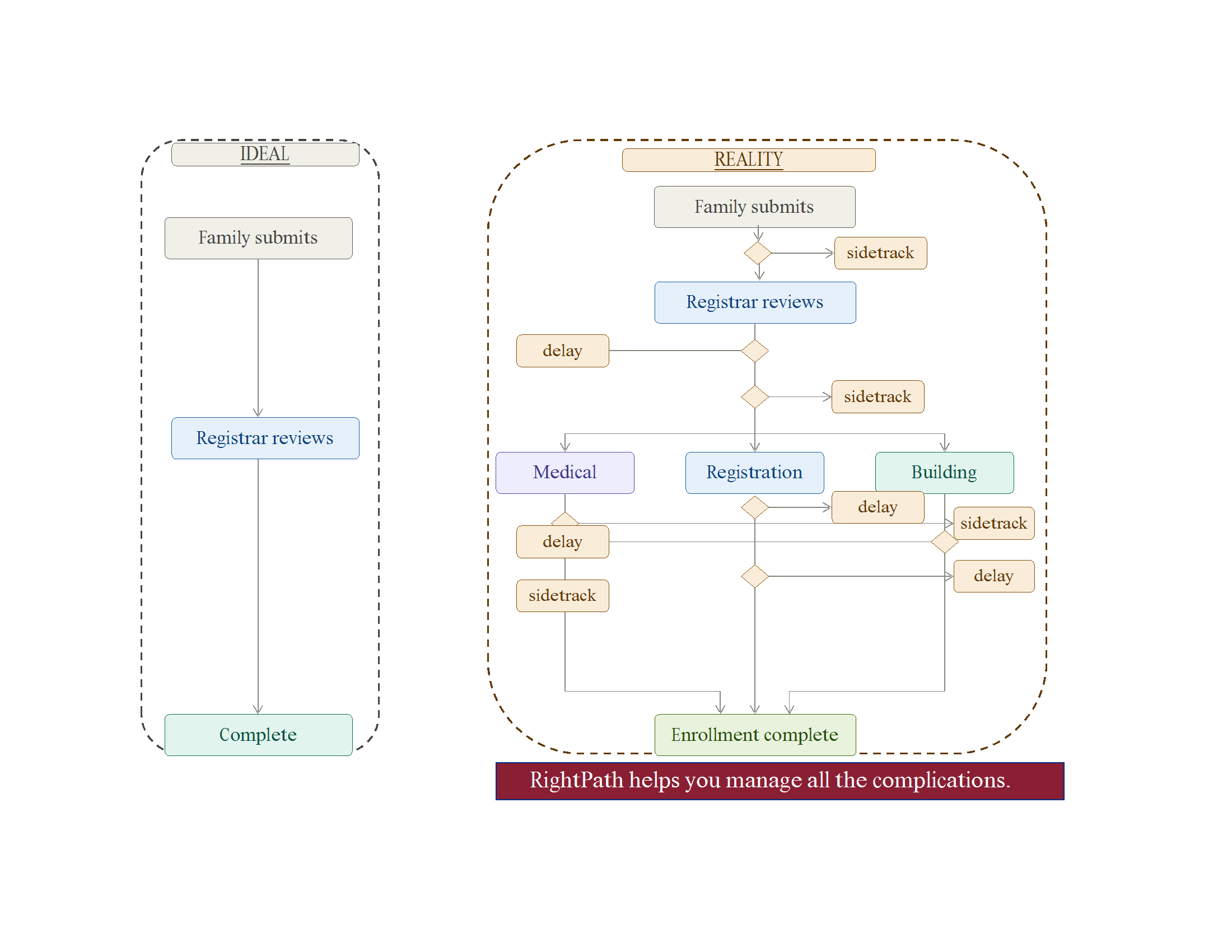
Every branch in that diagram is something a real registrar manages every enrollment season. Together they add up to a process that runs on heroics — not design.
Real Workflow Design
Good workflow design doesn’t mean more software. It means the right software — built around what registration actually requires, not just what the SIS needs at the end.
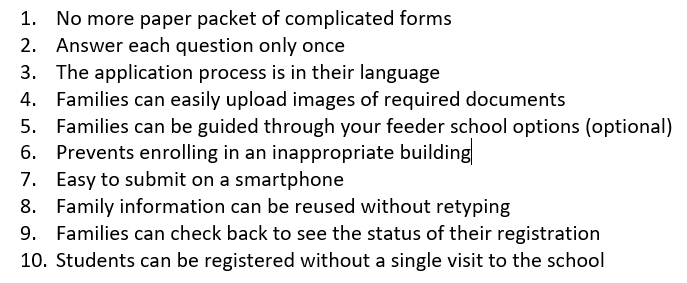
When registration is designed around workflow, families complete a single guided application in their language on their phone, uploading documents once rather than delivering them in person. The registrar sees a sorted, filterable queue — every application with a clear status, an assigned owner, and a logged reason for any delay. The school nurse works a separate, secure medical clearance workflow running in parallel, with no unsecured email chains carrying health data. Building administrators receive notifications when it’s their turn, without phone tag or manual handoffs.
Families receive automatic status updates when anything changes — fewer calls, less anxiety, a better first experience with the district. Every action, note, and document review is logged and auditable. And when everything is complete, the data that moves into your SIS is clean. No corrections downstream. No garbage in, garbage out.
THE DISTINCTION THAT MATTERS
The SIS stores final student records. RightPath™ Welcome Center handles everything that happens before your SIS receives clean, verified, enrollment-ready data. These are complementary systems — not competing ones. The gap between them is exactly where registration breaks down.
Questions Worth Asking Before Your Next Enrollment Season
If any of these land close to home, your workflow may be working against you:
- Do staff regularly work overtime during enrollment periods?
- Are families calling your office just to find out where their application stands?
- Is your medical clearance process running on email threads and memory?
- Can your registrar tell you right now every pending application and why each one is stuck?
- When data goes into the SIS, is it clean — or does someone clean it up afterward?
- When a family doesn’t hear back, do they call once — or three times?
There are no trick questions here. These are operational realities in most districts — not signs of failure, but signals that the tools aren’t keeping up with the work.
The Bottom Line
The districts that get registration right aren’t the ones with the biggest budgets or the most staff. They’re the ones that stopped expecting a data storage system to manage a people process, and built infrastructure around what registration actually requires: guided family intake, registrar workflow, exception handling, cross-department coordination, document management, and communication — all in one place, all connected, all auditable.
If registration season feels harder than it should, we’d like to show you what it looks like when the workflow is actually designed for the work.
RightPath™ Welcome Center was built for exactly this gap.
Our Welcome Center module gives your registrar a purpose-built workflow — guided family intake, side-by-side document review, secure medical clearance, templated communications, and a complete audit trail. We’re educators. We’re trainers. We’re also technology professionals.
Register for a Webinar →
Schedule a Free Consultation →
Next: 5 Signs Your District’s Registration Process Is Due for an Upgrade →